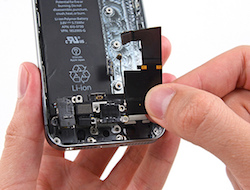
Microphone works poorly on the smartphone: why the other person cannot hear you
Microphone works poorly on the smartphone is a problem when the other person hears you quietly, with interruptions, with noise, or does not hear you at all during a call. Sometimes the voice disappears only in regular calls but records normally in the voice recorder. Sometimes it is the opposite: sound works in messengers, but becomes distorted when recording video. These symptoms may be related to the lower microphone, additional noise-canceling microphones, clogged openings, moisture, the body, settings, or the board.
If the other person cannot hear your voice on the phone, do not immediately open the device or try to clean the opening with a needle. In modern smartphones, microphone channels are very small, and meshes, membranes, and flex cables may be nearby. One careless movement can push dirt deeper or damage a sensitive element.
How to understand that the microphone is the problem
Microphone issues can appear in different ways. During a regular call, the voice may sound muffled; in Telegram or Viber, the other person may hear only noise; and when recording video, sound may appear with crackling. Sometimes the problem happens only on speakerphone or only in audio recording mode. That is why it is important to check several scenarios, not just one call.
- the other person can barely hear your voice;
- noise, crackling, or echo is heard during calls;
- sound disappears in messengers;
- the voice recorder captures sound too quietly;
- after water exposure, the voice became muffled;
- the microphone works only in one app;
- sound is distorted or disappears during video recording.
If the phone microphone records sound with interference, the reason is not always the module itself. Sometimes the opening is blocked by a case, protective film, dust, dirt particles, or moisture residue. Recording quality is also affected by app settings, microphone permissions, and system failures.
What you can check yourself
Before contacting Ai-Yai-Yai, remove the case and check whether it covers the lower opening. Record a short audio clip in the voice recorder, then test a voice message in a messenger and a regular call. If the issue appears only in one app, check microphone permissions and restart the smartphone.
Do not use needles, pins, toothpicks, or compressed air under strong pressure. If there is dirt or moisture inside the opening, cleaning it yourself can make the situation worse. Be especially careful after water exposure: even if the phone is dry on the outside, oxidation and residue may remain inside.
Why the microphone starts working worse
The microphone in the phone transmits voice poorly most often because the opening is clogged or moisture got inside. A smartphone is constantly in a pocket, bag, hands, near dust, cosmetics, and fabric lint. Over time, the microphone channel becomes blocked, sound becomes quieter, and the other person hears the voice as if through a wall.
Microphone placement differs by model. For reference, you can view pages for Xiaomi 14, Infinix Note 11s, Doogee S96 GT, and iPad 6 9.7 2018. In some devices, the main microphone is located near the charging port; in others, there are several additional microphones for noise cancellation, so diagnostics must account for the specific construction.
How diagnostics works at Ai-Yai-Yai
When a customer comes with the complaint “microphone works poorly on the smartphone”, the technician clarifies where exactly the sound disappears: in regular calls, messengers, voice recorder, camera, or speakerphone mode. Then the main microphone, additional microphones, speakers, meshes, body, flex cables, moisture signs, app permissions, and system settings are checked.
If the reason is dirt, the specialist carefully cleans the channel and checks the sound again. If there are signs of moisture, impact, or unstable board behavior, the device is inspected more deeply. The customer receives a clear explanation of why voice transmission became poor, how long the service may take, and what cost will be approved before work begins.
Where to get help
You should contact Ai-Yai-Yai if people hear you poorly during calls, voice messages are recorded with noise, the microphone became muffled after water exposure, sound disappears in videos, or the issue appeared after a fall. It is also better not to delay if the smartphone also charges poorly, overheats, or loses connection.
In Kyiv, you can choose a convenient location by district or metro station: Osokorky, Pozniaky, Kharkivska, Darnytsia, Livoberezhna, Shuliavska, KPI, Sviatoshyn, Teremky, VDNH, Holosiivska, and other areas. Customers from other cities in Ukraine can send the device via Nova Poshta. After inspection, the specialist explains the cause, timeframe, and service cost.
More details